

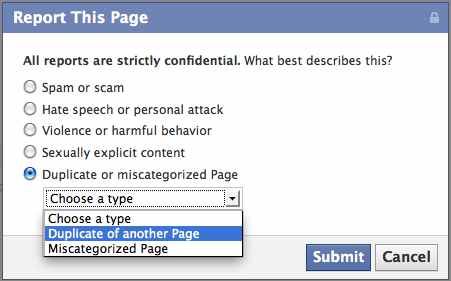
Do you have a floating Facebook Suitcase Page representing your business that you are not admin of and don’t know how to remove it? Follow these 3 simple steps to notify Facebook & hopefully they will remove a duplicate company Page for you in no time!
 Step One:
Got to the page that you want to remove with the suitcase image.
Click on ‘Report this Page’ on the left menu bar.
A pop up window will appear.
 Step Two:
Select the last option ‘Duplicate or miscategorized Page’
In the drop down menu that appears select ‘Duplicate of another Page’
 Step Three:
In another tab, open the Page this is a duplicate of that you want to keep.
Copy the url address and paste it into the box that appears asking ‘Which page is this a duplicate of?’
Then press ‘Submit’
Hopefuly in no time soon this ‘Suitcase Company Page’ will no longer exist and the likers added to your ‘Real Page’ if they aren’t already! Good luck and let me know if this was helpful!